Natural vs Soft Glam: AI Styling Compared
By the Glow Up AI teamLast updated:
Natural and Soft Glam are two whole-look directions, not separate makeup sliders. This side-by-side uses one existing AI demonstration input and its two precomputed outputs; it is not a customer result or a guarantee for your photo.
What is the difference?
Natural requests an understated daytime direction: airy hair, brushed brows, a subtle lip and a simple cream knit. Soft Glam requests more defined eyes, rose-toned cheeks and lips, face-framing waves and a floral cardigan. The fixed prompts describe intended changes; the actual image can differ.
Both presets may edit hair and clothing as well as makeup. Neither performs a verified undertone or face-shape assessment, and you cannot independently adjust the makeup, hairstyle or outfit in these presets.
Compare the same demonstration photo
The three images below share the same AI-rendered demonstration input. Look at the brows and lashes, cheek and lip colour, hair shape and clothing; then check whether the face, lighting and background stayed consistent. Do not assume the prompt exactly describes each output.
The examples are precomputed and can be viewed without signing in, uploading a photo or spending credits. They illustrate a styling direction, not typical customer outcomes.
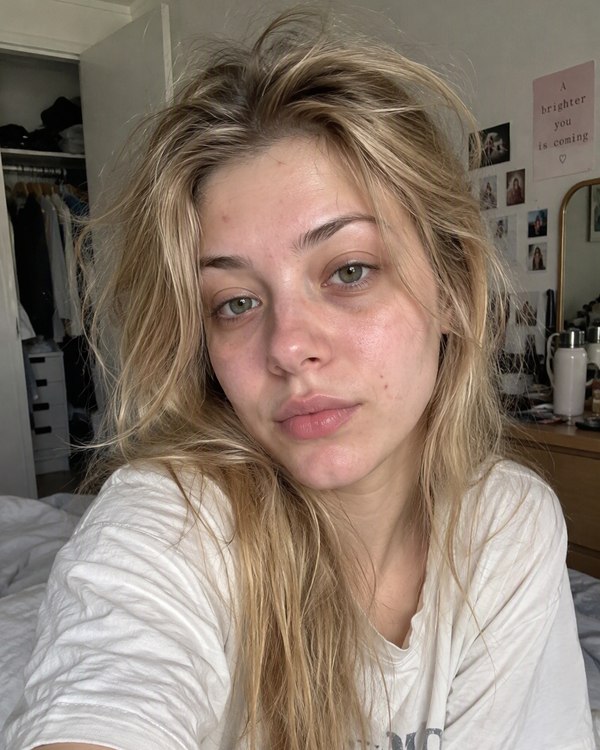
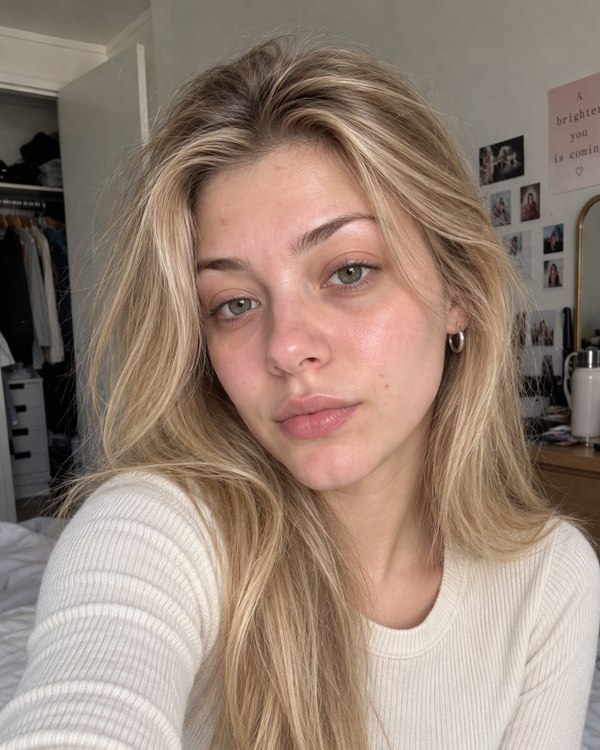
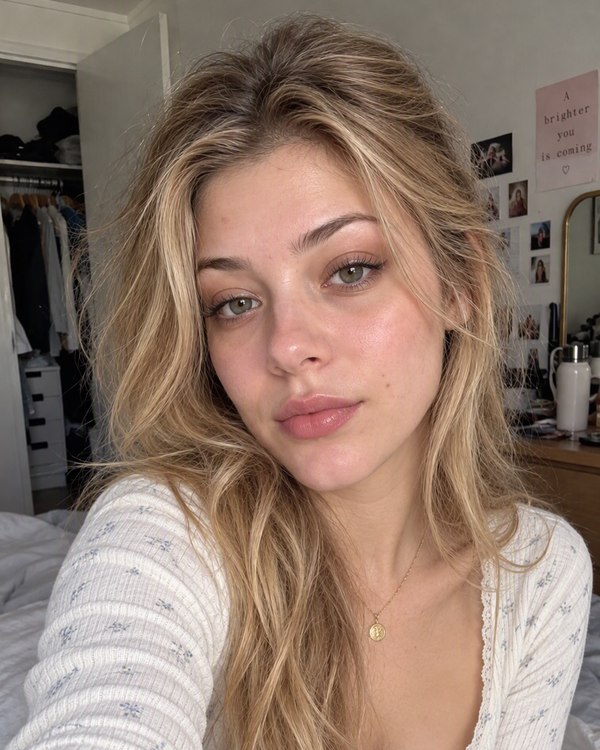
The same AI demonstration input, shown with two precomputed whole-look outputs. These are not customer photos.
Choose a direction, not a verdict on your face
Choose Natural if you want to explore a quieter everyday styling direction. Choose Soft Glam if you want to explore more defined makeup and waves. These are preferences rather than rules about age, complexion, gender or who is allowed to wear a look.
For a fair comparison on your own photo, keep your input the same and inspect each output for unintended edits. A different apparent result may come from AI lighting or facial changes, not makeup alone.
What does it cost?
Natural uses 2 credits per generated image; Soft Glam uses 3. Personal generation requires an account and credits, and each request is confirmed separately. These are credit costs, not per-image purchase prices.
A technically failed job returns its credits. Subscription plans, if offered, renew until canceled; review the actual amount and terms on the pricing page before purchasing.
Review current prices and renewal terms before deciding how many credits you need.
Check the result before using it as a reference
Compare the eyes, nose, jaw, skin tone, hairline, background and camera framing with the original. AI may change details it was asked to preserve. The output is not a professional consultation and does not prove that products or hairstyles will look the same in real life.
For photo preparation, failure handling and privacy, read the selfie styling guide before trying a personal preview.
About this guide
The Glow Up AI team wrote this guide to explain the tools, styling choices and credit costs on this website. Examples are AI-generated. Use the styling notes as a starting point and adapt them to your own hair, products and clothes.
Before you try a look in real life
An AI styling preview is not a skin assessment, diagnosis or guarantee of results. For basic care and product safety, consult these independent resources:
- FDA: Cosmetics Safety Q&A: Personal Care Products
The FDA distinguishes products intended to beautify from products intended to treat disease. A styling image cannot tell you whether a product is suitable for your skin.
- American Academy of Dermatology: Face washing 101
The AAD recommends gentle cleanser, lukewarm water and avoiding scrubbing. Skin concerns belong with a qualified dermatologist, not an AI photo preview.
These references support the care notes above, not Glow Up AI’s image quality or effectiveness. Neither organization endorses this product.
Explore hair, makeup and outfit ideas on your own photo
Use the web tool · no app download